So, now that the player controller is at a stable position in the game, I’ll go about the features that are implemented and the thought process that was there behind.
So the first thing I’ll discuss about is the code structuring of the player component and how it was set up.
Initially, the player component was comprised for the following
- Character Animator
- Grapple,
- WallRun
- Combat Controller
However, soon I realised that these all had one common problem, they all referenced the player animator which raised some issues i.e when one code is sending one info to the animator, if another code sent/changed the variables at the same time, there could have been conflicts and thus a lot of waste of information was taking place along with wasted CPU cycles. We all know that the less CPU cycles used, the more framerate we get and so the first challenge was to fix that which meant that only one code references the animator as it’s manager and the rest send in their data as per requirement to this central controller, hence, the Character Animator was used for that and it was inherited from the standard Unity Thirdperson Controller.
Thus started the way for refactoring the entire codebase for the player itself which did take time but less that what I had initially imagined (maybe I’m good, who knows).
The Character Animator now has all the components required to animate the player as per situation. From simply walking, turning to wall running, combos, shooting and so on.
Though most of the code revolves around the Update methods, mainly LateUpdate and Update. Though I did try to compress the code further by setting up separate functions for each situation which only delayed their executions. Mind it, the animator was already set up to not have delays in transitions but the code’s message relaying was becoming delayed and hence all had to be move into the Update methods since as a player, I would be interested in seeing instant feedback since the code is not visible to me in text format but in visuals and thus this step was taken.
This code is ~ 900 lines long and has most functions that one would expect. Since the sword unsheathing is an animation event, this particular function is also in this code where the position of the Sword Transform is changed from the Sheathed position, an empty object place in the position on the back of the player to the other object which is similar to this, an empty object in the player’s left hand. When the animation reaches a particular frame, the sword changes it’s parent object and voila, the sword is in the hand though the sword’s own transform is always at 0,0,0 (Unit Position). The local position i.e.. Similar is for the sheath position where the sword is at unit position but the parent object to that sword takes care of the positioning to make it look that the sword is attached to the back of the player.
Since the player can now swim too, the rest of the conditions of jumping, sword unsheathing/lockon and sliding had to be put in an else condition to check is the player is swimming or not since the player can be in water but standing still without the water too high and thus checking for only water would have yielded unwanted results.
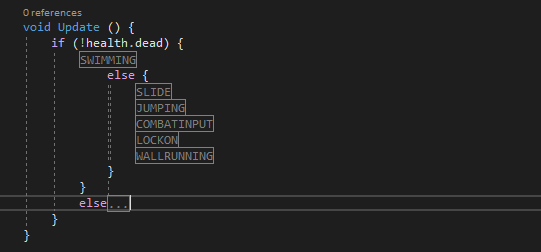
Next, the LateUpdate which takes care of the aiming of the player since they anyway have a slight delay activating, they don’t need to be tested every frame and hence they were moved to the LateUpdate to save on performance.
This section of the code, the LateUpdate.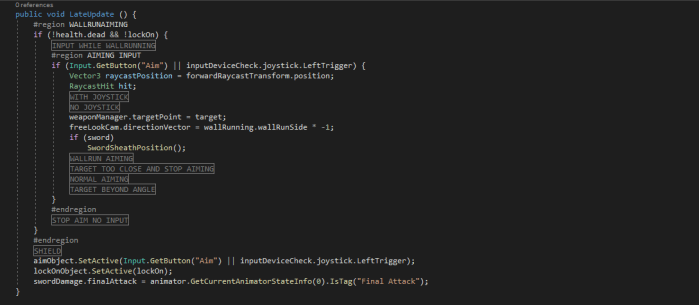
This is part is a far more complex since it has to check for angles i.e, at what angle the player is aiming, is it possible to aim at that angle and so on. I will not give out the code which is why I am hiding it under pre-processor directives and I’m not sorry about that.
The FixedUpdate is the one with the least lines of code, only five lines of code for it, no more.
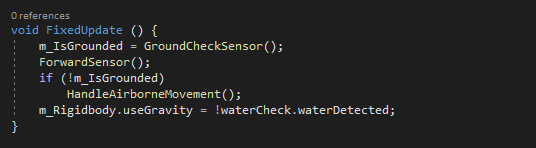
This mainly checks for the ground and that is there anything infront of the player or not in a certain distance. It also handles the airborne movement while the player is in mid air which is the same code from the standard assets but tweaked for this particular situation.
Will go through the rest of the codes in a second follow up post. I will conclude this post here for now.

 PortFolio